


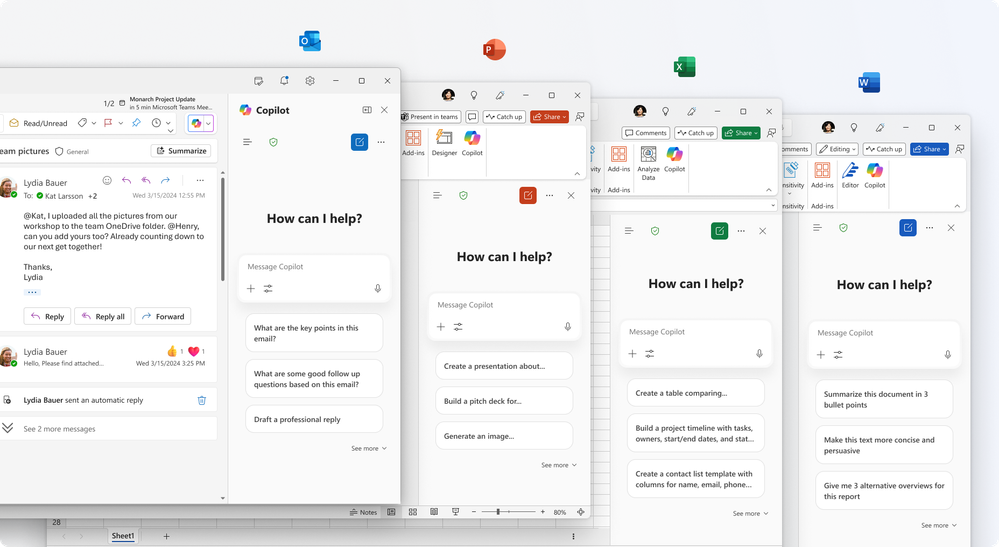
Two announcements, one clear signal: As AI players make moves into workspace collaboration, Microsoft is firing back in a bid to maintain its long-standing dominance. Two recent announcements about integrated AI are firmly signaling that:
Copilot Chat is now free inside Word, Excel, PowerPoint, Outlook, and OneNote for all users — no paid license required.
New AI agents in Teams — Facilitator for meetings, Channel Agents, and Community Agents — are rolling out, but only for licensed Copilot users.
Together, these moves change the AI baseline for organizations — and raise the stakes for strategy.
Copilot Chat Free
This means every worker in your organization can now have access to AI embedded into their document workflow. Although there are some key differences to the paid vs free versions, this is a BIG move that enables the power of Microsoft’s AI assistant, without the need to add licensing costs.

Changing the Calculus on AI
Until now, giving workers access to Copilot was a matter of cost and value. Many organizations I know required employees to validate their need for Copilot before considering purchasing a license. But this cost saving approach also led to shadow AI — with many employees turning to freemium options like ChatGPT, Perplexity, Meta, etc.
It’s clear now that avoidance as a strategy just doesn’t work anymore.
IT leaders and executives should see this as a huge win — security-wise and financially. Providing access to Microsoft’s more secure approach to AI in your tenant without additional costs and better governance makes sense from every angle.
What’s Changed for Licensed Microsoft Users Without a Copilot License?
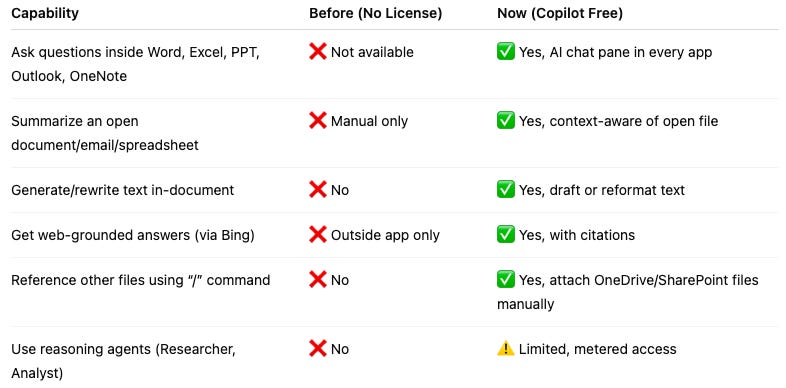
Before, if you didn’t have a Copilot license, you had little to no access to integrated AI functionalities inside Office apps.
Now, every worker can access a free version of Copilot to address work-related content that they couldn’t before.
Here’s what free Copilot Chat includes:
Available everywhere: In Word, Excel, PowerPoint, OneNote, and Outlook at no additional cost.
Grounding: Responses are based on public web data, powered by LLMs — not your organization’s work content… BUT
Content awareness: Copilot Chat can reference the open file (Word, Excel, PowerPoint), page (OneNote), or email/calendar item (Outlook) that you are actively working in for context.
Task automation: It can draft, summarize, rewrite, and automate tasks within the context of the active file, alongside web information.
Pay-as-you-go agents: Access to metered AI agents, including Researcher and Analyst.
Tailored responses: Prompts can specify formatting, style, and tone for generated output.
LIMITATIONS: No automatic access to organizational content like SharePoint, OneDrive, or Teams. Scope is limited to the open file plus web grounding.
Not every Microsoft license is eligible to access the free Copilot experience — you can check your eligibility here.
Table: What’s New for Copilot Free Users
Free vs Paid — Why and When to Upgrade
While Copilot Free offers a myriad of features and benefits for users, the difference between Free and Licensed may still be worth it — depending on your workflows.
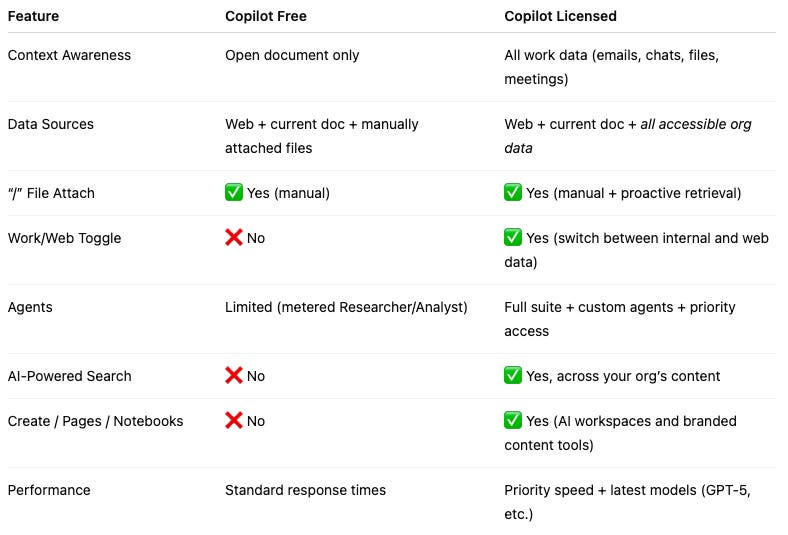
With Free, the context for the AI conversations is limited to the active document you’re working in. Still, this limitation can be overcome by adding additional documents to the context. You’ll just have to add them manually.
With the Licensed Copilot, users can innately access their entire body of work, including documents (excel, word, etc.), emails, Teams chats, and Teams meetings, from the prompt. That means client calls, internal documents, and even chats with colleagues can be leveraged to help create, draft, and organize content and information with a single prompt.
For users that need to pull together disparate information from a variety of contexts (calls, documents, emails, etc.) upgrading to a paid Copilot License may make sense.
In short:
Free Copilot = a personal AI helper for the document you’re in.
Licensed Copilot = an organizational AI coworker that can reason across everything you have access to.
Table: Copilot Free vs. Copilot Paid
Teams AI Assistants — Another Paid Feature
Microsoft’s second announcement this month is big for Teams users: AI agents inside Teams. This one, however, is exclusive to licensed users, and could be another reason to consider upgrading.
I’ve long held the belief that Microsoft’s intentions with Teams was to turn it into the “organizational operating system”. Not just a tool for collaboration, but a platform for organizations to build their entire workflows around. These AI agents in meetings, channels, and communities are clear indications of that strategy:
Facilitator Agent (Meetings): Sets agendas, manages time, captures real-time notes, answers questions, tracks tasks, and even drafts documents during or after meetings.
Channel Agents: Act as domain experts inside Teams channels, drafting status reports, answering questions from channel history, flagging deadlines, and integrating with Planner.
Community Agents (Viva Engage): Proactively answer questions, draft updates, cite references, and scale expertise across communities.
These aren’t just productivity hacks — they repositioning Teams as a space where AI collaborates alongside humans, not just as a tool in the background.
Why Microsoft Did This, and What It Means For Leaders and Their Orgs
Let’s be perfectly frank — this wasn’t Microsoft being generous. It’s a strategic play.
Competition: ChatGPT and Gemini already give away powerful free tiers.
Seeding demand: Some workers will inevitably run up against the limits of free Copilot and request licenses from their employers.
Lock-in: Once Copilot is part of your daily workflow, you’re less likely to normalize to external AI tools, especially if they can’t incorporate email and Teams conversations.
For leaders, Free Copilot for all changes the starting point of the AI conversation:
Before: Copilot was a purchase decision. Leaders could hold off based on cost, ROI, and security concerns.
Now: AI is becoming a commodity, accessible to every worker — for free.
As executives and IT leaders come to terms with the reality of AI infiltrating every aspect of work, it’s becoming clear that avoidance as a strategy is neither effective nor practical.
Being AI ready means establishing governance, training, and usage policies before the “lite” experience creates uncontrolled habits.
Making AI a Platform for Organizational Success
Microsoft’s move to make Copilot accessible for everyone, alongside the integrations of AI into Teams, is all about making their platform all about productivity.
But more AI ≠ more productivity.
This is exactly the moment where the Cognitive Operating Model (COM) becomes not only useful — but a critical framework for ensuring AI is being implemented and used accountably, reasonably, and effectively. It’s a system we’ve developed to help organizations:
Map workflows where AI creates measurable value.
Design delegation models for humans + AI.
Build feedback loops for accuracy, trust, and compliance.
Without a framework, universal AI risks chaos. With COM, it becomes a foundation for scaling responsibly. Send me a chat and ask me about the COM framework anytime!